
Use our Tax Calculator Nepal to estimate your annual salary tax, monthly TDS and take-home pay. This free salary tax calculator uses your salary, bonus, tax status and eligible deductions. It then shows how much tax may come out of your pay.
If you need an income tax calculator Nepal employees can use without complex formulas, enter your details in the calculator above. You can include EPF, CIT, SSF, life insurance and medical insurance payments.
In day-to-day banking work, I often see customers compare their gross salary with the amount credited to their accounts. However, those two amounts are not the same.
Your employer may deduct tax, PF, CIT, SSF, insurance, staff loans and other payments before crediting your salary. Therefore, you must understand both your annual tax and your expected take-home pay.
How to Use the Salary Tax Calculator Nepal
Our salary tax calculator Nepal follows the same basic process used in payroll. Complete the three main sections shown in the calculator.
Step 1: Complete “Your Details”
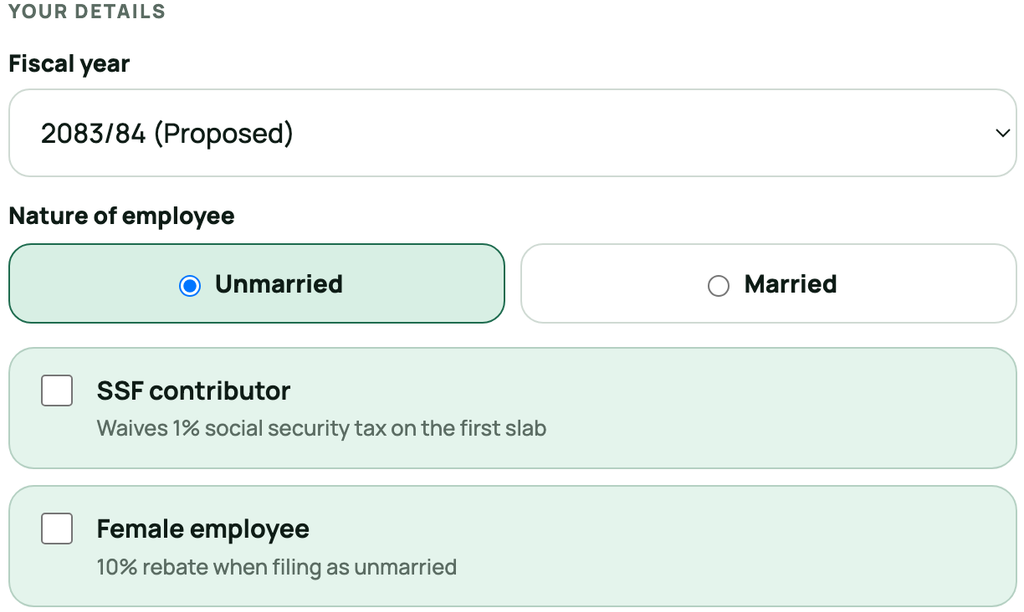
First, select the fiscal year.
Nepal can change its income tax rates through each Finance Act. Therefore, the same salary may produce a different tax result in another fiscal year.
Next, choose your nature of employment:
- Unmarried
- Married
Then select the other options that apply to you.
SSF Contributor
Turn on the SSF Contributor option if you contribute to the contribution-based Social Security Fund.
Eligible SSF contributors do not pay the 1% Social Security Tax on the first tax slab. However, higher tax rates can still apply when taxable income crosses the first slab.
Do not select this option only because you contribute to EPF or CIT. EPF and CIT reduce taxable income, but they do not provide the same 1% SSF waiver.
Female Employee
Turn on the Female Employee option if you are a resident woman earning only remuneration income and meet the tax requirements.
The calculator will apply the available 10% rebate to the calculated tax. On this calculator, the rebate applies when the employee files under unmarried assessment.
Step 2: Enter Your Annual Income
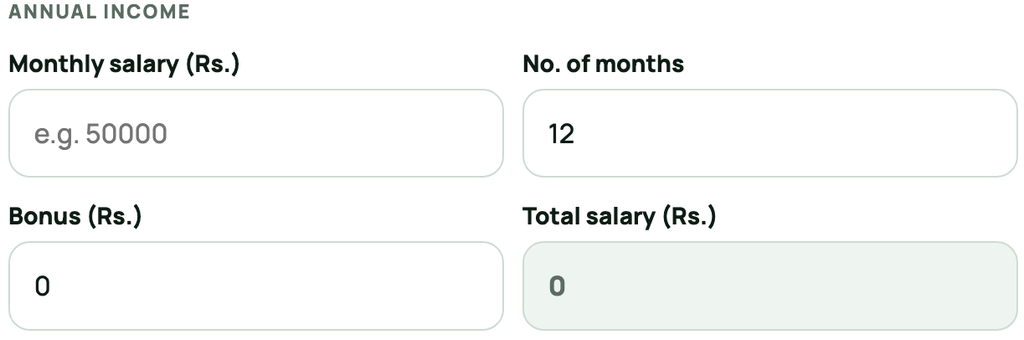
Now complete the Annual Income section.
The calculator asks for three details:
- Monthly Salary
- Number of Months
- Bonus
Monthly Salary
Enter your gross monthly salary before tax and other deductions.
Do not enter the net amount credited to your bank account. Also, do not subtract EPF, CIT, SSF or insurance from this amount.
Gross salary may include:
- Basic salary
- Grade allowance
- Position allowance
- Regular cash allowances
- Overtime
- Commission
- Performance incentives
- Other taxable salary payments
For example, if your gross monthly salary is NPR 70,000, enter 70000 in the Monthly Salary field.
Number of Months
Enter the number of months for which you will receive the salary during the selected fiscal year.
Enter 12 if you receive the same salary for the full year. However, enter the actual number of months if you joined or left the organisation during the year.
For example, suppose you joined in the fifth month of the fiscal year and received salary for eight months. In that case, enter eight instead of reducing your monthly salary.
Bonus
Enter your annual bonus, festival allowance or other one-time taxable payment in the Bonus field.
Do not add the same amount to both monthly salary and bonus. Otherwise, the calculator will count it twice.
After you enter these details, the calculator will show your Total Salary automatically.
Step 3: Enter Your Annual Deductions
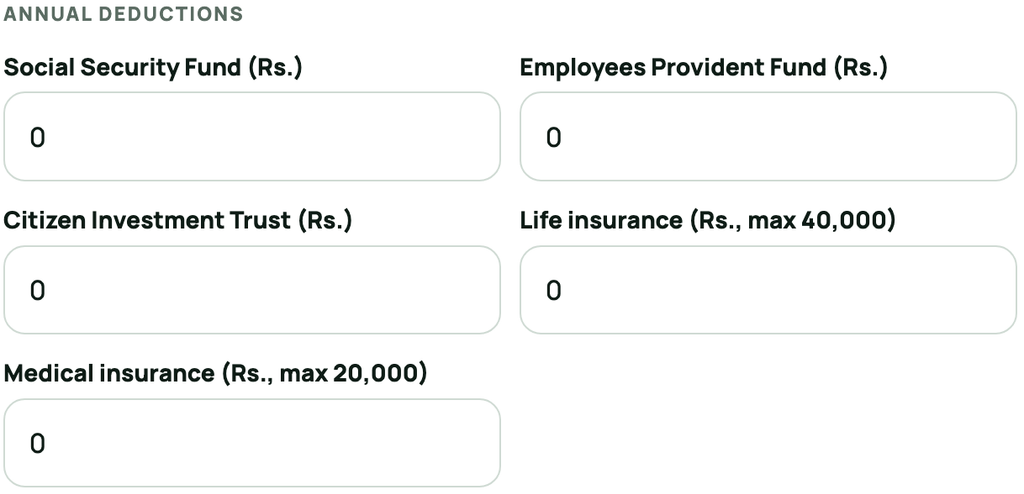
Next, complete the Annual Deductions section.
Enter only the amount paid or expected to be paid during the selected fiscal year.
The calculator provides these fields:
- Social Security Fund
- Employees Provident Fund
- Citizen Investment Trust
- Life Insurance
- Medical Insurance
Use the amount shown on your payroll sheet, contribution statement or payment receipt. Do not use the total balance available in your PF, CIT or SSF account.
Your account balance can include deposits from earlier years, employer contributions and investment returns. Therefore, it may not match the deduction allowed for the current year.
How to read your salary result
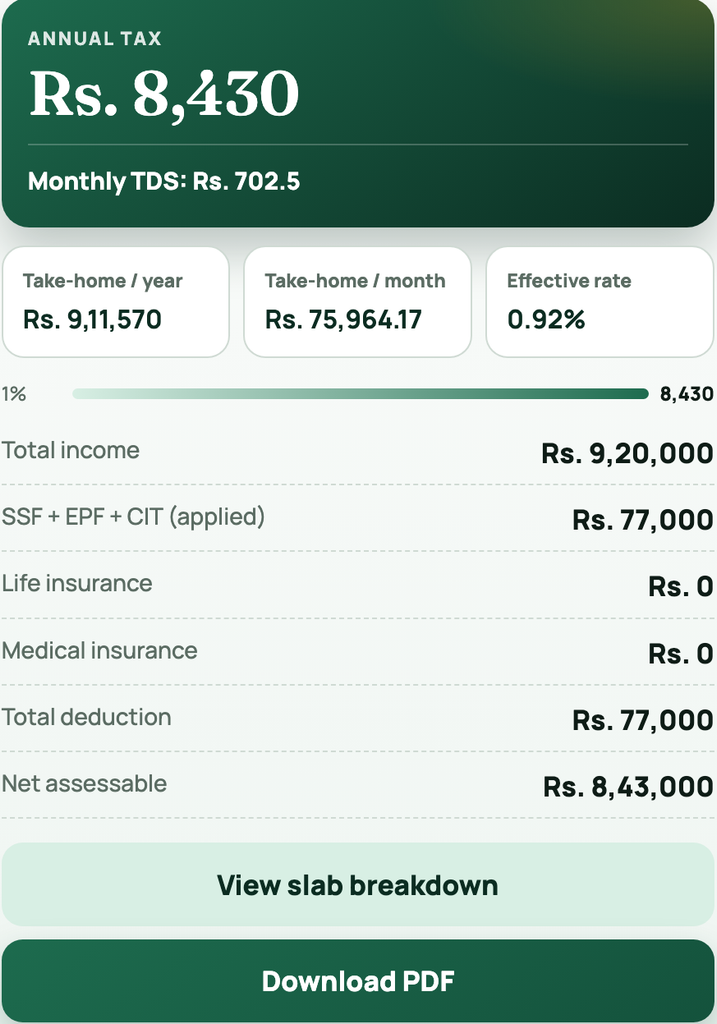
Income after estimated tax is salary for the entered months plus bonus, less estimated annual tax. Estimated cash take-home after tax and entered employee contributions also subtracts the full employee SSF, EPF and CIT amounts entered.
Tax-deductible retirement contributions may be capped; the cash estimate subtracts entered contributions even above that cap. Do not enter employer contributions as employee payments. Insurance premiums, loan repayments, other payroll deductions and unentered payments are not subtracted from this cash estimate.
The monthly income-after-tax and cash figures divide their annual amounts, including bonus, by the entered whole number of months (1–12). The separate Monthly TDS figure uses annual tax divided by 12 in the existing calculator. These are averages, not a promise that each payslip will match. Download PDF records the inputs and estimate.
These retained illustrations may show an earlier interface. Follow the live calculator labels described above.
Current Income Tax Slabs in Nepal for FY 2083/84
For FY 2083/84, the same individual income tax slabs apply to single and couple assessments.
| Net assessable income | Tax rate |
|---|---|
| First NPR 10,00,000 | 1% |
| Next NPR 5,00,000 | 10% |
| Next NPR 10,00,000 | 20% |
| Next NPR 15,00,000 | 27% |
| Income above NPR 40,00,000 | 29% |
Nepal applies these rates progressively. Therefore, crossing a tax slab does not move your entire income into the higher rate.
For example, suppose your net assessable income is NPR 11 lakh. The first NPR 10 lakh falls under the 1% slab. Only the remaining NPR 1 lakh falls under the 10% slab.
The first NPR 10 lakh is not fully tax-free. It generally attracts 1% Social Security Tax.
However, eligible contributors to the contribution-based Social Security Fund do not pay this 1% tax. The current rates come from the IRD tax schedule for natural persons for FY 2083/84.
Single vs. Married Tax Assessments
Many employees believe that married taxpayers always receive a higher tax limit. This was true under earlier tax slabs. However, it is not true for FY 2083/84.
| Fiscal year | Single first slab | Married first slab |
|---|---|---|
| FY 2083/84 | NPR 10,00,000 | NPR 10,00,000 |
| FY 2082/83 | NPR 5,00,000 | NPR 6,00,000 |
Therefore, choosing married status does not automatically reduce tax under FY 2083/84.
Still, you should select your correct status. The calculator may also support older fiscal years where single and married limits differ.
Do not call the first slab a complete “tax exemption limit.” A 1% tax normally applies to this income. Only eligible SSF contributors receive the first-slab waiver.
How Allowable Deductions Reduce Your Salary Tax
Allowable deductions reduce your net assessable income. As a result, they can reduce your annual tax and monthly TDS.
The calculator uses this simple order:
Gross annual salary − eligible deductions = net assessable income
It then applies the tax slabs to the net assessable income.
This means eligible PF, CIT, SSF and insurance amounts reduce taxable income before the 1% and higher tax rates are calculated.
Employees Provident Fund Deduction
Employees Provident Fund is a long-term retirement saving plan. Most employers deduct the employee contribution through monthly payroll.
Enter the eligible EPF contribution for the selected fiscal year. Do not enter your complete PF balance.
Your EPF balance may include:
- Previous deposits
- Employer contributions
- Interest
- Current-year employee contributions
The salary tax calculator needs the current-year eligible contribution, not the account balance.
Citizen Investment Trust Deduction
Eligible Citizen Investment Trust contributions can also reduce taxable income.
Some employees contribute to CIT through payroll. Others make separate deposits during the fiscal year.
For FY 2083/84, eligible contributions to approved retirement funds may generally be deducted up to the lower of:
- NPR 5,00,000; or
- One-third of assessable income.
This limit applies to the combined eligible retirement contribution. It does not give separate NPR 5 lakh limits for EPF and CIT.
For example, suppose you contributed NPR 150,000 to EPF and NPR 200,000 to CIT. Your combined retirement contribution would be NPR 350,000.
The calculator checks the applicable limit before deducting the amount from your income.
Social Security Fund Deduction
Enter the eligible SSF contribution made during the fiscal year.
SSF can reduce your net assessable income. In addition, eligible SSF contributors receive a waiver of the 1% tax on the first slab.
This makes SSF different from normal EPF and CIT contributions. EPF and CIT can reduce taxable income, but they do not waive the 1% tax by themselves.
Life Insurance Deduction
Enter the annual life insurance premium paid during the fiscal year.
The allowable deduction is the lower of:
- Actual annual premium paid; or
- NPR 40,000.
For example, if you paid NPR 30,000, the calculator can deduct NPR 30,000. If you paid NPR 60,000, it will limit the deduction to NPR 40,000.
Keep the insurance premium receipt. The policy document alone may not prove that you paid the premium during that fiscal year.
Medical Insurance Deduction
Enter the medical insurance premium paid to an eligible resident insurance company.
The allowable deduction is the lower of:
- Actual premium paid; or
- NPR 20,000.
For example, a premium of NPR 15,000 can receive a deduction of NPR 15,000. A premium of NPR 30,000 will be limited to NPR 20,000.
Practical Salary Tax Calculation
Suppose an employee enters these figures:
| Calculator field | Amount |
|---|---|
| Monthly Salary | NPR 1,00,000 |
| Number of Months | 12 |
| Bonus | NPR 1,00,000 |
| Total Salary | NPR 13,00,000 |
| EPF and CIT | NPR 1,80,000 |
| Life Insurance | NPR 40,000 |
| Medical Insurance | NPR 20,000 |
The total eligible deductions are NPR 2,40,000.
Therefore:
NPR 13,00,000 − NPR 2,40,000 = NPR 10,60,000 net assessable income
For a non-SSF employee, the estimated tax would be:
- First NPR 10,00,000 at 1% = NPR 10,000
- Remaining NPR 60,000 at 10% = NPR 6,000
- Estimated annual tax = NPR 16,000
Without these deductions, tax on NPR 13 lakh would be about NPR 40,000. Therefore, the deductions reduce the estimated annual tax by NPR 24,000.
However, the employee does not receive NPR 2,40,000 as extra cash. PF and CIT remain invested for future use. Insurance premiums pay for insurance coverage.
The direct benefit to current take-home pay is the lower tax deduction.
Why the Calculator May Differ from Your Payslip
The calculator gives an estimate based on the information you enter. Your payroll figure can differ for several reasons.
Common reasons include:
- Your employer included taxable allowances.
- You received a bonus later in the year.
- Your monthly salary changed.
- You joined or resigned during the fiscal year.
- You submitted insurance receipts late.
- Payroll did not receive your CIT deposit details.
- You changed employers during the year.
- Your employer included taxable non-cash benefits.
- You have income outside your employment.
- Your payslip includes loan or advance deductions.
Therefore, compare the calculator with your annual salary tax sheet, not only one monthly payslip.
Why Your Calculated TDS Matters for e-TDS and PAN
Understanding your calculated Tax Deducted at Source (TDS) is crucial for compliance, especially for taxpayers registered under a Permanent Account Number (PAN). The accuracy of these calculations directly influences the e-TDS submissions made by your employer. Ensuring these records match the directives from the Inland Revenue Department (IRD) circulars is essential for ultimately obtaining your annual Tax Clearance Certificate.
Who Can Use This Income Tax Calculator Nepal Tool?
This income tax calculator Nepal tool is useful for:
- Salaried employees
- Bank and financial institution staff
- Government employees
- Private-sector employees
- HR and payroll teams
- Employees planning CIT deposits
- People comparing job offers
- Employees checking monthly TDS
- People estimating take-home salary
- Mid-year joiners and resignees
You do not need to create an account. Also, you can change the figures and compare different salary or deduction plans.
Frequently Asked Questions
What is a salary tax calculator?
A salary tax calculator estimates tax on employment income. It uses your annual salary, tax status, deductions and applicable tax slabs. It can also estimate monthly TDS and take-home pay.
Is the Tax Calculator Nepal free?
Yes. You can use the Tax Calculator Nepal without registration. Enter your details in the calculator above to see the estimated result.
Is the first NPR 10 lakh tax-free in FY 2083/84?
No. The first NPR 10 lakh normally attracts 1% Social Security Tax. However, eligible SSF contributors receive a waiver of this 1% tax.
Do married employees receive a higher limit?
Not under FY 2083/84. Both single and married assessments have the same first NPR 10 lakh slab. Older fiscal years may use different limits.
Can I deduct both EPF and CIT?
Yes. However, both amounts fall under the combined approved retirement contribution limit. You cannot claim a separate maximum limit for each contribution.
What is the maximum life insurance deduction?
The maximum deduction is NPR 40,000 per fiscal year. If you paid less, the calculator uses the amount you paid.
What is the maximum medical insurance deduction?
The maximum deduction is NPR 20,000 per fiscal year. The premium must meet the applicable requirements.
Why is my monthly TDS higher after receiving a bonus?
A bonus increases your annual employment income. As a result, part of your income may move into a higher tax slab. Payroll may then adjust TDS over the remaining months.
Can I calculate tax after a salary increase?
Yes. Enter the revised annual figures. If your salary changed during the year, calculate the income from each salary period and use the combined annual amount.
Is the downloaded PDF an official tax document?
No. The PDF is a calculation report for planning and review. Use your employer’s tax certificate or an IRD document for official purposes.
When Do the FY 2083/84 Tax Rates Take Effect?
The tax rates for the fiscal year 2083/84, as outlined in the Finance Act 2083, became effective from Shrawan 1, 2083. This legislative change impacts how income tax liabilities and the 1% Social Security Fund (SSF) waivers are calculated for eligible individuals and businesses across Nepal.
Calculate Your Salary Tax Now
Use the Tax Calculator Nepal above to check your annual tax, monthly TDS and expected take-home salary.
Choose the correct fiscal year. Then enter your employee details, income and annual deductions. Finally, review the slab breakdown or download the PDF.